只是電腦去送修~才買15天~心裡是非常的幹
整個在挑戰我= =~還好取件時是個妹仔
頓時讓我心情好了一點
好吧~抱怨完了我們進入正題....吧
上次討厭鬼已經教了大家要如何配置Struts2
(若還沒有配置完Struts2的話請先看這篇Struts2 架構配置教學)
所以今天就以上次的教學為基礎再加上Spring
讓專案的架構變成Struts2 + Spring
癈話不多說~讓討厭鬼開始今天的配置教學吧
這次配置Spring所需要的jar為
struts2-spring-plugin-2.2.3.jar
org.springframework.context-3.1.1.RELEASE.jar
org.springframework.beans-3.1.1.RELEASE.jar
org.springframework.core-3.1.1.RELEASE.jar
org.springframework.web-3.1.1.RELEASE.jar
org.springframework.asm-3.1.1.RELEASE.jar
org.springframework.expression-3.1.1.RELEASE.jar
commons-logging-1.1.1.jar
以上是配置Spring所必備的jar檔
接下來要配置web.xml
在web.xml中加入
<context-param>
<param-name>contextConfigLocation</param-name>
<param-value>xxxxxxxxx.xml</param-value>
</context-param>
<listener>
<listener-class>org.springframework.web.context.ContextLoaderListener</listener-class>
</listener>
其中xxxxxxxxxx.xml是Spring設定檔的位置及名稱
若有多個時用逗點分開
如果沒有設定Spring的設定檔的話,那預設會抓applicationContext.xml
以下是我配置
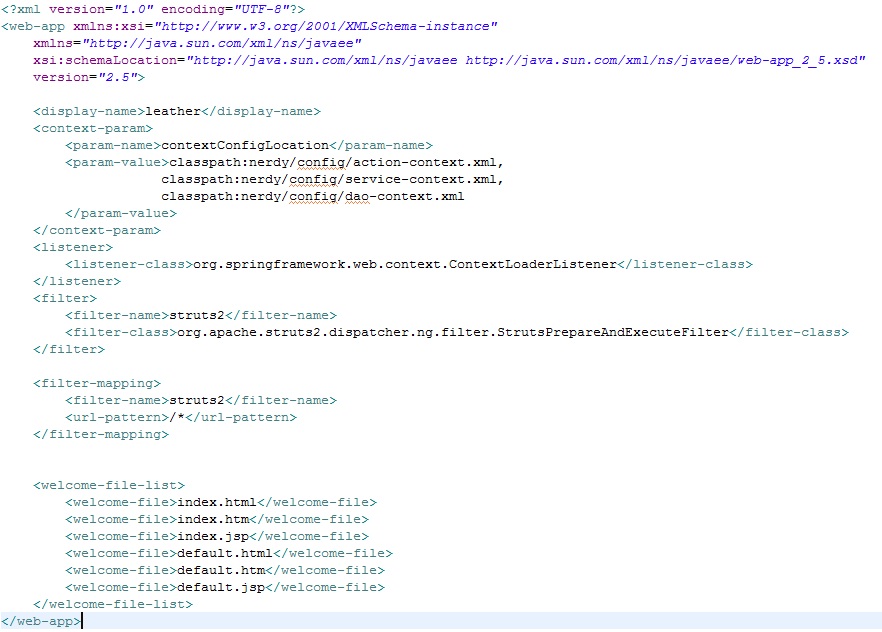
<?xml version="1.0" encoding="UTF-8"?>
<web-app xmlns:xsi="http://www.w3.org/2001/XMLSchema-instance"
xmlns="http://java.sun.com/xml/ns/javaee"
xsi:schemaLocation="http://java.sun.com/xml/ns/javaee http://java.sun.com/xml/ns/javaee/web-app_2_5.xsd"
version="2.5">
<display-name>leather</display-name>
<context-param>
<param-name>contextConfigLocation</param-name>
<param-value>classpath:nerdy/config/action-context.xml,
classpath:nerdy/config/service-context.xml,
classpath:nerdy/config/dao-context.xml
</param-value>
</context-param>
<listener>
<listener-class>org.springframework.web.context.ContextLoaderListener</listener-class>
</listener>
<filter>
<filter-name>struts2</filter-name>
<filter-class>org.apache.struts2.dispatcher.ng.filter.StrutsPrepareAndExecuteFilter</filter-class>
</filter>
<filter-mapping>
<filter-name>struts2</filter-name>
<url-pattern>/*</url-pattern>
</filter-mapping>
<welcome-file-list>
<welcome-file>index.html</welcome-file>
<welcome-file>index.htm</welcome-file>
<welcome-file>index.jsp</welcome-file>
<welcome-file>default.html</welcome-file>
<welcome-file>default.htm</welcome-file>
<welcome-file>default.jsp</welcome-file>
</welcome-file-list>
</web-app>
接下來要設置Spring的設定檔
這邊要看各位客倌在web.xml中設定幾個,就要有幾個
因為討厭鬼在web.xml中設定了3個所以我要在
src底下的nerdy.config這個package底下加入action-context.xml,service-context.xml,dao-context.xml這三個檔案
在Spring的設定檔中的開頭加入
<beans xmlns="http://www.springframework.org/schema/beans"
xmlns:xsi="http://www.w3.org/2001/XMLSchema-instance" xmlns:context="http://www.springframework.org/schema/context"
xmlns:tx="http://www.springframework.org/schema/tx" xmlns:aop="http://www.springframework.org/schema/aop"
xsi:schemaLocation="
http://www.springframework.org/schema/beans
http://www.springframework.org/schema/beans/spring-beans-3.1.xsd
http://www.springframework.org/schema/context
http://www.springframework.org/schema/context/spring-context-3.1.xsd
http://www.springframework.org/schema/tx
http://www.springframework.org/schema/tx/spring-tx-3.1.xsd
http://www.springframework.org/schema/aop
http://www.springframework.org/schema/aop/spring-aop-3.1.xsd ">
</beans>
若有用到多個設定檔,那開頭的設定應該是一樣的~~~~~~~
基本上在這個時候Spring已經算是架設完畢了
只是還算不上是 Struts2 + Spring 的架構
因為還沒有將Struts2納入Spring的控管之下
所以要再加入一行
<bean id="xxxxxx" class="xxxxx.xxxx"></bean>
id隨便取class是指要指定的class檔
以下是我的配置
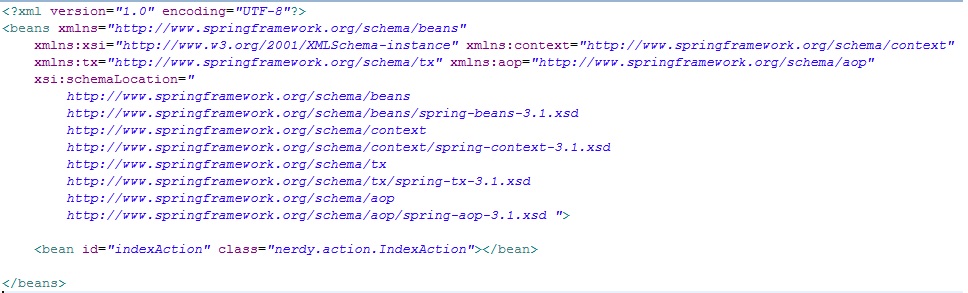
<?xml version="1.0" encoding="UTF-8"?>
<beans xmlns="http://www.springframework.org/schema/beans"
xmlns:xsi="http://www.w3.org/2001/XMLSchema-instance" xmlns:context="http://www.springframework.org/schema/context"
xmlns:tx="http://www.springframework.org/schema/tx" xmlns:aop="http://www.springframework.org/schema/aop"
xsi:schemaLocation="
http://www.springframework.org/schema/beans
http://www.springframework.org/schema/beans/spring-beans-3.1.xsd
http://www.springframework.org/schema/context
http://www.springframework.org/schema/context/spring-context-3.1.xsd
http://www.springframework.org/schema/tx
http://www.springframework.org/schema/tx/spring-tx-3.1.xsd
http://www.springframework.org/schema/aop
http://www.springframework.org/schema/aop/spring-aop-3.1.xsd ">
<bean id="indexAction" class="nerdy.action.IndexAction"></bean>
</beans>
接著再把Struts.xml打開
將原本action class的名稱 改成在Spring設定檔中的bean id的名稱
如範例本來是nerdy.action.IndexAction改為我剛剛在Spring設定檔中的bean id 的indexAction
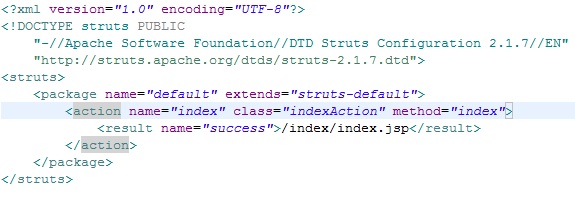
<?xml version="1.0" encoding="UTF-8"?>
<!DOCTYPE struts PUBLIC
"-//Apache Software Foundation//DTD Struts Configuration 2.1.7//EN"
"http://struts.apache.org/dtds/struts-2.1.7.dtd">
<struts>
<package name="default" extends="struts-default">
<action name="index" class="indexAction" method="index">
<result name="success">/index/index.jsp</result>
</action>
</package>
</struts>
再將專案放到tomcat上執行,再鍵入網址 http://localhost:8080/leather/index.action
畫面跑出來了~建置成功
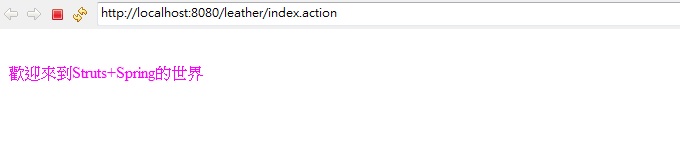
恭喜你~你已經學會了 Struts2+Spring了
基本上Spring的設定檔裡面的配置都差不多~端看個人怎麼設定
在這邊我是有關action的放在action-context.xml
有關service的放在service-context.xml
有關dao與資料庫的放在dao-context.xml
因為這邊只是先講建置架構~所以有關Spring的用法就沒有講了~
等到Hibernate建置完成
再開始說要如何去使用Spring的set跟annotation
補充
因為還沒有建置Hibernate所以資料庫連線的地方就先不講了
會在建置Hibernate的時候跟大家一起說明的
下次就要發表加入hibernate的重頭戲了

 程式教學 (5)